
Spelling bees are intense. One wrong letter and you are out. Now imagine practicing that pressure against an AI opponent that adjusts from easy words to hard ones across 10 rounds. That is exactly what Spelling Bee Showdown does: it flashes a word on a chalkboard for three seconds, hides it, and challenges you to spell it from memory while an AI named Professor Lexicon tries to do the same.
MuleRun Chat generated this entire game from a single text prompt. You describe what you want, and MuleRun Chat builds it as a playable web page you can share with anyone.
What Is the AI Spelling Bee Game and How Does It Work?
Spelling Bee Showdown is a browser-based game where you play against an AI in a spelling bee. A word appears on a chalkboard-style screen for three seconds. Once it disappears, you type your answer from memory. Your AI opponent, Professor Lexicon, attempts the same word at the same time.
The game runs 10 rounds with progressive difficulty. Rounds 1 through 3 use common, shorter words. Rounds 4 through 7 introduce medium-difficulty vocabulary. Rounds 8 through 10 test advanced spelling with longer, less familiar words. Your score and Professor Lexicon’s score update after each round, so you always know where you stand.
Professor Lexicon is not perfect. The AI opponent makes occasional mistakes, especially on harder words. This keeps the competition realistic and gives you a genuine chance to win. You are not just drilling vocabulary against a flawless machine. You are competing against an opponent that mirrors the kind of errors a real person might make.
How Do You Play the Spelling Bee Game?
You play by watching a word flash on screen for three seconds, then typing it from memory before your AI opponent does. Each round follows the same structure:
- A word appears on the chalkboard for three seconds
- The word disappears and a text input field appears
- You type the word from memory and submit your answer
- Professor Lexicon submits its answer at the same time
- Both answers are revealed with correct or incorrect labels
- Scores update and the next round begins
The three-second flash window is the core mechanic. It separates this from a typical spelling quiz online where you hear a word and type it. Here you see the word briefly, which tests visual memory alongside spelling knowledge. This approach aligns with how many spelling activities work in classrooms: students see a word, cover it, and write it from recall.
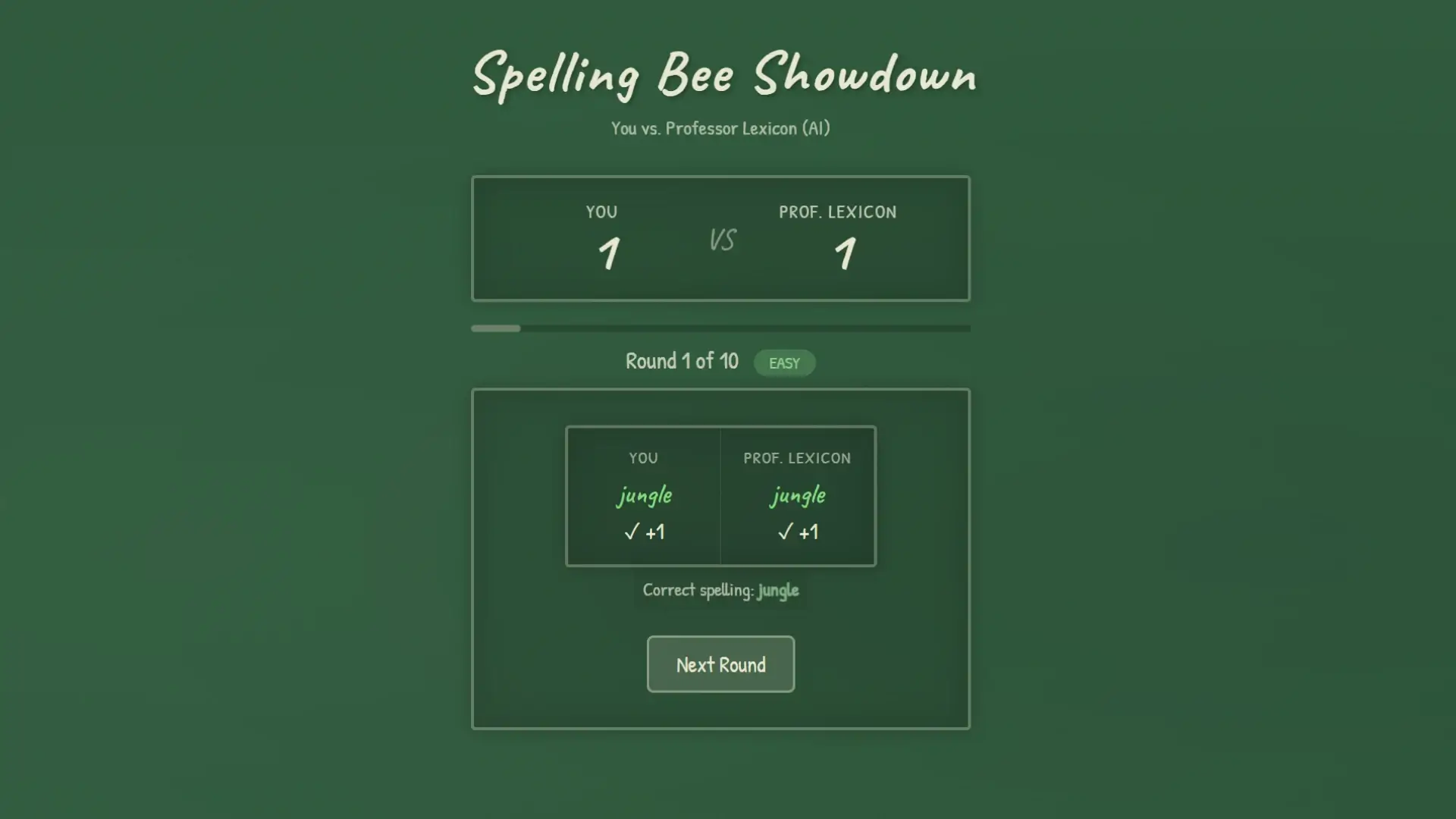
After 10 rounds, the game shows your final score against the AI. You can restart immediately to try again with a new set of words.
What Makes This Different from a Regular Spelling Quiz?
Three things separate this from a standard spelling quiz: a live AI competitor, visual memory training through timed word flashes, and progressive difficulty across 10 rounds. Most spelling quiz platforms give you a word, you type it, and you get a score with no opponent, no time pressure on memorization, and no escalating difficulty within a single session.
Live AI competition
You play against an AI in a spelling bee in real time. Professor Lexicon answers each round alongside you, and you see its result immediately after submitting yours. The competitive format adds motivation that solo spelling drills do not provide. Research from educational psychology shows that competitive elements increase engagement and recall in vocabulary tasks.
Visual memory training
The three-second word flash trains a different skill than audio-based spelling. You process the word visually, store it in short-term memory, and reproduce it. This is closer to how people encounter unfamiliar words in reading. If you want to improve spelling through active recall rather than passive repetition, visual memory exercises are more effective than hearing a word read aloud.
Progressive difficulty curve
The difficulty increases across the 10 rounds, so you are not stuck on words that are too easy or overwhelmed from the start. Easy rounds build confidence. Medium rounds test your range. Hard rounds push your limits. This progression keeps each session productive whether you are a strong speller looking to sharpen skills or someone working to improve spelling fundamentals.
Can Teachers Use This as a Classroom Spelling Activity?
Yes. Teachers share the game link with students and everyone plays directly in a browser without downloads or accounts. Spelling Bee Showdown works as a ready-made classroom tool with multiple usage modes.
- Warm-up exercise: students play one round of 10 words at the start of a language arts class
- Independent practice: assign it as a station activity during literacy rotations
- Group competition: project the game on a screen and have students take turns against Professor Lexicon
- Homework alternative: send the link home as a spelling practice assignment that feels like a game
The competitive format works especially well for educational classroom games because students are motivated by the score comparison with the AI. They are not just completing a worksheet. They are trying to beat an opponent, which keeps attention focused on the task.
Teachers who want a customized version with specific word lists can build one with MuleRun Chat. Describe the vocabulary you need, the grade level, and the number of rounds, and MuleRun Chat generates a new game page with those exact specifications.
How the super agent assembles the game
When a teacher or student requests a custom version, MuleRun Chat’s super agent reads skills.md files from specialized sub-agents. Each skills.md file defines a specific capability: one sub-agent handles the chalkboard display and word flash timing, another manages the AI opponent logic, another controls scoring and round progression. The super agent selects the relevant skills, coordinates their outputs, and assembles the final result into a single working page. This orchestration layer is why a plain text description produces a complete spelling game with visual memory mechanics, an AI competitor, and progressive difficulty in one pass. The architecture runs on Anthropic’s Claude model, which powers the reasoning and code generation behind each sub-agent.
Build Your Own Spelling Bee Game
Create your own spelling bee game with custom words, difficulty levels, and themes. Sign up for free credits and start building, or try the spelling bee template directly.
See more use cases.
Frequently Asked Questions
Is the spelling bee game free?
Yes. Spelling Bee Showdown is free to play in any browser. No account or download required.
Can I change the word difficulty?
The default game progresses from easy to hard across 10 rounds. To create a version with a specific difficulty level, use MuleRun Chat to generate a custom game.
Does the AI actually make mistakes?
Yes. Professor Lexicon has sharp but imperfect spelling skills. It occasionally misspells words, especially at higher difficulty levels, making the competition realistic.
Can I use my own word list?
The default game uses a built-in word list. You can create a custom version with your own words by describing your requirements in MuleRun Chat.
Is this good for kids?
Yes. The game uses grade-appropriate vocabulary in the easy and medium rounds. Teachers and parents use it as a spelling practice tool for students of various ages.