What Is the MS Paint AI Drawing Trend?
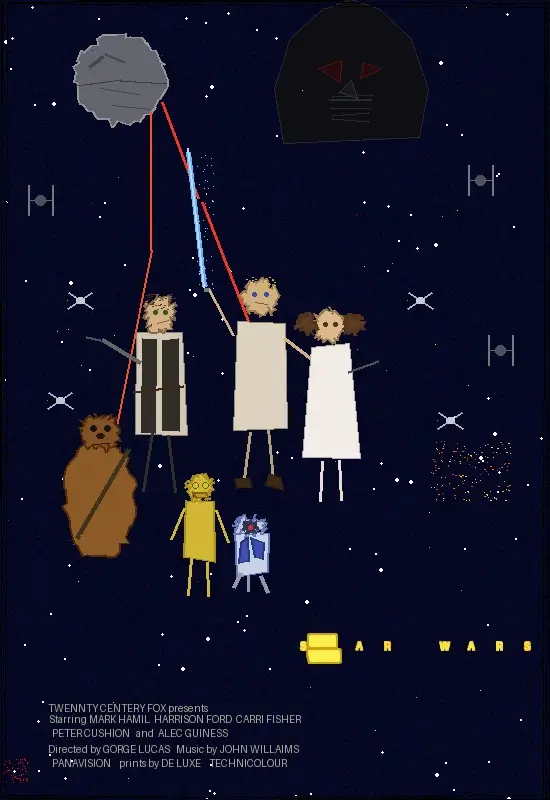
The MS Paint AI drawing trend turns any photo into art that looks like someone drew it in Microsoft Paint with a mouse, zero talent, and five seconds of effort. You upload a selfie, a pet photo, or a landscape, and the AI redraws it with thick wobbly lines, flat colors, mismatched proportions, and Comic Sans labels.
The trend started on Korean Threads when user @withgrdnrush posted a prompt that instructs AI to redraw photos “as badly as possible in MS Paint style.” The post spread to X through @arrakis_ai and within a week, the format was everywhere on Instagram, TikTok, and Reddit.
The appeal is the contrast. People post their best photo next to the AI’s worst interpretation. A professional headshot becomes a lopsided circle with dot eyes. A scenic vacation photo becomes a blue rectangle with a yellow circle sun. The worse the drawing, the funnier the post.
How Do You Turn a Photo into an MS Paint Drawing with AI?
The process takes about 15 seconds:
- Open the MS Paint Drawing template in MuleRun Chat
- Upload any photo
- The template redraws your image in MS Paint style with thick lines, flat fills, Comic Sans labels, and deliberate proportional errors
- Download or screenshot the result
The prompt instructs the AI to use only tools available in classic MS Paint: the pencil tool, the fill bucket, basic shapes, and the text tool with Comic Sans. No gradients, no layers, no transparency. The constraint is what makes the output look authentic.
What Makes Some MS Paint Drawings Funnier Than Others?
The best results come from high-contrast source material:
- Professional photos: studio headshots, wedding photos, and graduation portraits produce the strongest contrast between polished original and terrible drawing
- Pets: dogs and cats get simplified into barely recognizable blobs with stick legs, which owners find hilarious
- Food photography: elaborate restaurant dishes reduced to colored circles with Comic Sans labels like “food” or “yummy”
- Group photos: the AI struggles with multiple faces, producing progressively worse interpretations for each person
Avoid photos that are already low quality. The humor depends on the gap between original and drawing. A blurry phone photo does not produce as strong a contrast as a crisp, well-lit image.
Can You Customize the Drawing Style?
The base prompt produces standard MS Paint chaos, but you can modify it:
- “Make it look like a 5-year-old used MS Paint for the first time”: increases the randomness and adds more stray lines
- “Add Comic Sans labels pointing to everything in the image”: the AI adds arrows and text identifying objects in the most obvious way possible
- “Draw it as if someone was trying their best but is terrible at art”: produces more effort-filled but still bad results
- “Use only the spray paint tool”: changes the texture from hard lines to spraypaint dots
MuleRun Chat lets you iterate on the prompt without re-uploading. Generate multiple variations from the same photo and pick the funniest one.
Make Your Own MS Paint Drawing
Sign up for free credits and open the MS Paint Drawing template in MuleRun Chat to get your AI drawing in seconds.
See more use cases.
Frequently Asked Questions
Is the MS Paint AI drawing generator free?
Yes. Open the template in MuleRun Chat, upload a photo, and get your drawing at no cost.
Does it work with any photo?
Yes. Selfies, pet photos, landscapes, food, group shots, and professional portraits all produce results.
Can I adjust how bad the drawing looks?
Yes. Modify the prompt to make it more or less chaotic. Ask for “slightly recognizable” or “even worse” to control the output.
Where did the viral prompt come from?
Korean Threads user @withgrdnrush created the original prompt. It spread to X, Instagram, and Reddit in late April 2025.
Can I use the drawing for social media?
Yes. Download or screenshot the result and post it. The side-by-side format (original vs AI drawing) works best for engagement.