
What Is a Memory Match Game and Why Do Kids Love It?
A memory match game is a card-flipping puzzle where players turn over two cards at a time to find matching pairs on a grid. Kids love it because each round builds spatial memory, pattern recognition, and focus without requiring reading or complex rules. The cards shuffle into new positions every game, so memorizing last round’s layout does not help. Each attempt strengthens cognitive skills that educational researchers link to early reading and math readiness.
Memory match sits in a category of fun puzzles that parents actively search for. Unlike action games that reward speed, matching games reward attention. A two-year-old can play a 2x2 grid with animal emojis. A five-year-old can handle a 4x4 or 6x6 board with dozens of pairs. The difficulty scales naturally with age.
The problem is finding safe kid games online. Most childhood games online run inside ad-heavy wrappers. Banner ads, autoplay videos, and pop-ups interrupt gameplay. Parents searching for games with no ads and puzzles for kids end up on sites that monetize attention instead of protecting it.
How Do You Build a Memory Match Game with AI?
MuleRun Chat generates a complete memory match game from a single text prompt. You describe what you want, and the AI writes the code, builds the layout, and publishes a playable game to a unique URL. No templates to configure. No code to edit.
The steps:
- Open the memory match template in MuleRun Chat
- Describe the game: how many pairs, which emojis or images, grid size, and any rules you want (timer, move limit, scoring)
- The AI generates a working game with a shuffled board, flip animations, match detection, and a move counter
- Share the URL with your kids, students, or family: it runs in any browser on any device
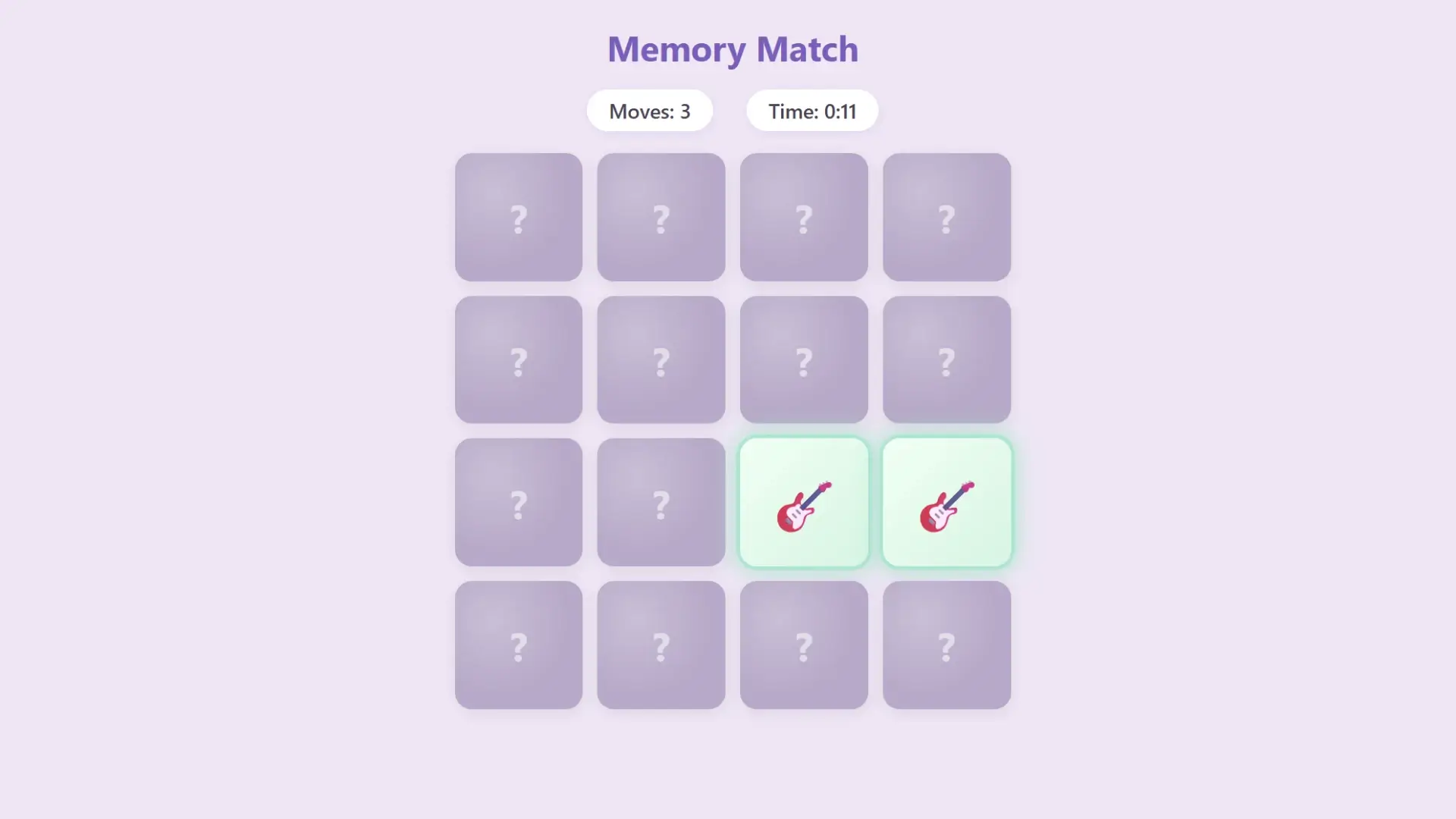
The game at the link below uses 8 emoji pairs on a 4x4 grid. Each card shows an emoji when flipped: dogs, pandas, cats, strawberries, watermelons, oranges, guitars, and sunflowers. A move counter tracks every flip. A timer runs from the first click. The entire game was generated from a prompt and published in under a minute.
How the super agent assembles your game
When you submit a prompt, MuleRun Chat’s super agent reads skills.md files from specialized sub-agents. Each skills.md file defines a specific capability: one sub-agent handles card grid layout, another manages flip animations and match detection, another controls the scoring and timer logic. The super agent selects the relevant skills, coordinates their outputs, and assembles the final result into a single working page. This orchestration layer is why a plain text description produces a complete game with functional code, responsive design, and interactive elements in one pass. The architecture runs on Anthropic’s Claude model, which powers the reasoning and code generation behind each sub-agent.
How Do You Personalize the Game for Each Age Group?
You personalize the game by adjusting grid size, card count, and image complexity in your prompt. Games for 2 year olds need large cards, simple images, and only 2 to 4 pairs. Games for 3 year olds work best with 4 to 6 pairs and familiar objects like animals or fruit. Games for 5 year olds can handle 8 to 12 pairs with more abstract symbols or letters.
MuleRun Chat adjusts all of this through your prompt. Tell it the age range and it generates an appropriate grid. You can also specify the exact emojis, colors, and background to keep the game visually engaging for that age group.
Example prompts by age:
- Ages 2 to 3: “Build a memory match game with 4 cards, 2 pairs, using a cat emoji and a dog emoji on a pastel pink background”
- Ages 3 to 4: “Create a memory match with 8 cards, 4 pairs of farm animals, large card size, rounded corners”
- Ages 5 to 7: “Generate a 4x4 memory match game with 8 pairs of fruit emojis, a move counter, timer, and a congratulations message when all pairs are found”
- Ages 7 and up: “Build a 6x6 memory match game with 18 pairs of world flags, a scoring system that penalizes wrong guesses, and a leaderboard”
Each variation publishes to its own URL. You can create a library of fun puzzles for every age group in your classroom or family. Parents looking for safe kid games get a game that runs clean: no ads, no trackers, no in-app purchases. Educators searching for puzzles for kids get a tool they can customize to match their curriculum.
Can You Customize the Theme and Difficulty?
Yes. Every visual element, difficulty setting, and gameplay mechanic is controlled by your prompt in MuleRun Chat. You choose the visual theme, the difficulty curve, and the gameplay mechanics. Here is what you can change:
- Card content: emojis, letters, numbers, color blocks, or any Unicode character
- Grid size: 2x2 for toddlers up to 8x8 for advanced players
- Background and card colors: match a holiday theme, school colors, or a child’s favorite palette
- Timer: optional countdown that adds pressure or a stopwatch that tracks completion speed
- Move limit: set a maximum number of flips to increase challenge
- Sound effects: add a chime on match or a buzzer on miss
- Win screen: custom congratulations message, confetti animation, or a “play again” button
This level of customization turns a memory match game into a family puzzle game tailored to your household. Want a Halloween version with spooky emojis? Describe it. Need a classroom version with sight words instead of pictures? Type that prompt. The AI handles layout, logic, and styling in one pass.
Traditional game-builder platforms require you to drag elements onto a canvas, configure match rules manually, and export or host through their system. MuleRun Chat skips all of that. You describe the game in plain English and get a working URL.
Build Your Own Memory Match Game
Open the memory match template in MuleRun Chat, describe your game, and share the link with your kids or students. Sign up for free credits to start building.
See more use cases.
Frequently Asked Questions
Is the memory match game free?
Yes. MuleRun Chat offers free credits to new users. You can generate and publish a memory match game without paying.
Can I change the number of cards?
You control the grid size through your prompt. Request a 2x2 grid for 4 cards or a 6x6 grid for 36 cards.
Does it work on phones?
Yes. The game runs in any mobile browser. Cards resize automatically to fit the screen.
Are there ads in the game?
No. Games generated through MuleRun Chat contain no ads, pop-ups, or trackers.
Can I use it in a classroom?
Yes. Create multiple versions with different themes or vocabulary words. Each game gets its own shareable URL that students can open on any device.