What Is the Korean Baseball AI Video Trend?
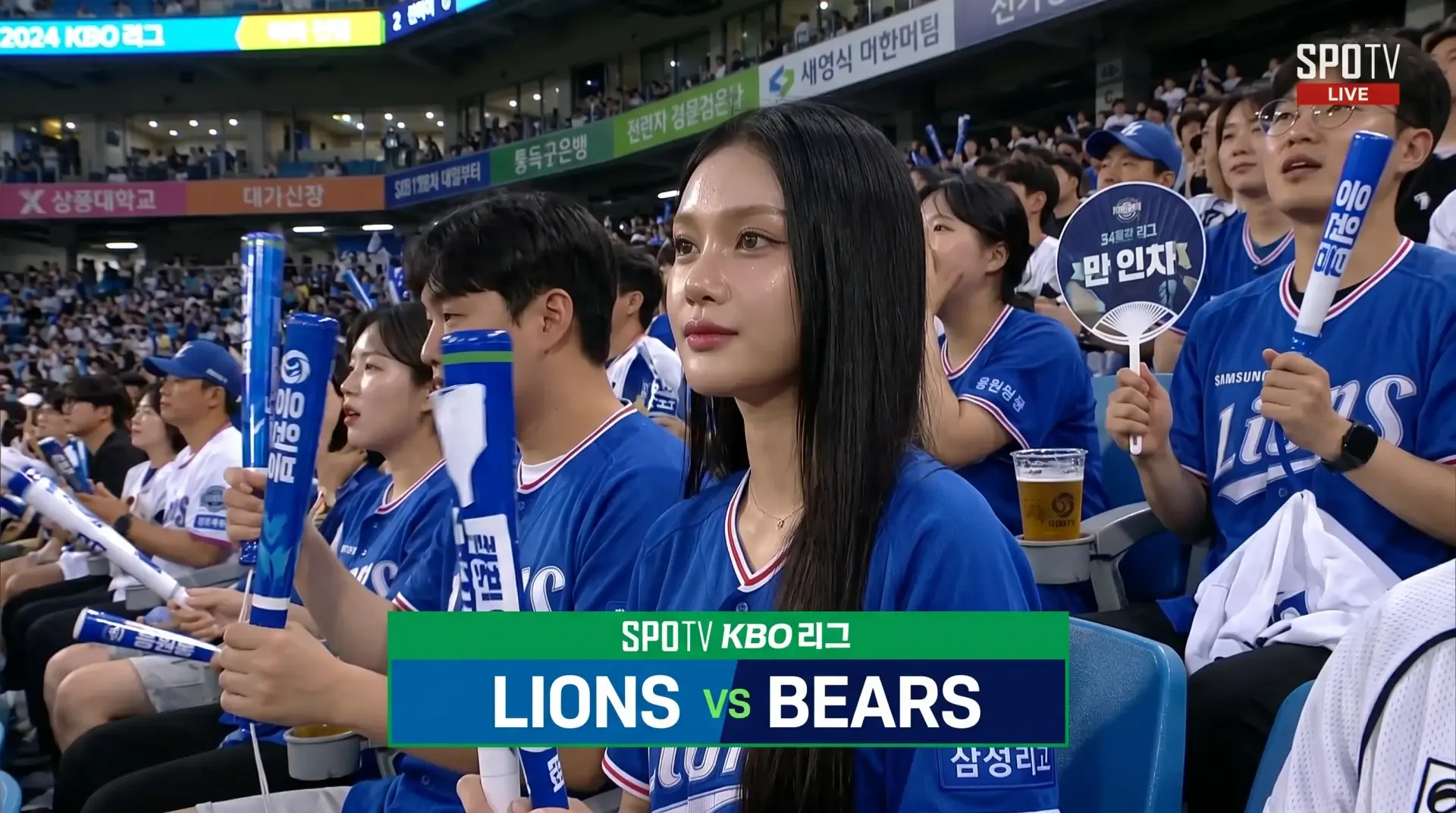
The Korean baseball AI video trend uses AI image generation and image-to-video animation to turn portrait photos into realistic KBO live broadcast footage where the subject appears to be caught on camera in the stadium crowd. The effect mimics a SPOTV broadcast camera slowly zooming into a spectator during a break in gameplay.
The trend started on X/Twitter with “the average Korean woman” posts, then spread to TikTok and Instagram where individual posts collected 35K+ likes. The look is specific: a candid telephoto broadcast camera, stadium crowd in team jerseys, warm LED lighting, and the “accidentally caught on camera” vibe that makes viewers do a double-take.
Through MuleRun Chat, you can customize the prompt for any of the 10 Korean baseball league teams: Samsung Lions, Doosan Bears, LG Twins, KT Wiz, NC Dinos, SSG Landers, Kia Tigers, Lotte Giants, Hanwha Eagles, or KIA Tigers. Each team has a distinct Korean baseball jersey color scheme you plug directly into the prompt’s [TEAM NAME] and [TEAM COLOR] placeholders.
How Do You Make a Korean Baseball AI Video From a Photo?
You make one by running a two-step AI pipeline: generate a broadcast-style still image from your face photo using an AI image editor, then animate that still into a 10-second video clip using an image-to-video model. The entire pipeline runs in a single MuleRun Chat session.
The Three-Step Pipeline
- Start with a clear face reference photo: front-facing, good lighting, neutral expression works best
- Feed it into the image generation model: Google Nano Banana 2 Edit generates the KBO broadcast still using identity-preserving editing
- Feed the generated still into the video model: Happy Horse 1.0 I2V animates the still into a 10-second 1080P broadcast clip with camera zoom and crowd movement
Scroll here to see the actual 3-step pipeline in action: reference photo, generated broadcast still, and animated clip. Try it yourself with this template to generate your own version from any portrait photo.
What Makes a Good Photo Prompt for AI Broadcast Footage?
A good photo prompt for AI broadcast footage requires four elements: strong identity anchoring to preserve the subject’s face, telephoto camera simulation for broadcast realism, specific broadcast overlay details, and candid framing language. Missing any one of these produces obviously fake results.
Here is the full image prompt used to generate the KBO broadcast still:
Using the first reference image as the STRONGEST identity anchor — preserve the subject's EXACT face: same face shape, same jawline, same eyes with same eye spacing and eyelid shape, same nose, same lips, same skin tone, same expression, same hair. Do NOT change them into another person. Do NOT make the face wider, older, sharper, or more stylized. Keep the same identity from the reference photo.

Generate an ultra-realistic candid KBO baseball live broadcast screenshot. The person is accidentally caught by a SPOTV live TV camera in the spectator seats at a [TEAM NAME] game. They are seated among a lively Korean baseball crowd wearing team gear. They wear a clean [TEAM COLOR] [TEAM NAME] baseball jersey over a simple casual top. They are holding [an iced drink / cheering stick / handheld fan — pick items]. They [notice the camera and give a small natural smile / watch the game unaware of the camera — pick behavior].

Realistic far-distance broadcast telephoto camera look: telephoto compression, mild video softness, slight motion blur in the surrounding crowd, warm stadium LED lighting, natural skin texture with pores and baby hairs, imperfect candid framing. Other fans visible around them cheering, some blurred. SPOTV KBO broadcast overlay style. 16:9 horizontal TV broadcast composition, Korean professional baseball stadium environment.
Settings: –aspect-ratio 16:9 –resolution 2K
Breaking Down Each Element
- Identity anchoring: the “preserve EXACT face” block prevents the AI from morphing your face into a generic person. This is the most common failure mode when people try a chatgpt photo prompt for this trend
- Telephoto look: “telephoto compression, mild video softness” mimics real broadcast cameras shooting from far away into the crowd
- Broadcast overlay: “SPOTV KBO broadcast overlay style” gives the model context about the specific Korean baseball TV look
- Candid framing: “imperfect candid framing” prevents the AI from centering the subject perfectly, which would look posed rather than caught on camera
Generic vs. Broadcast-Optimized Prompts
| Element | Generic prompt | Broadcast-optimized prompt |
|---|---|---|
| Face preservation | “a person at a baseball game” | “preserve EXACT face shape, jawline, eyes, nose, lips, skin tone” |
| Camera style | “photo of someone in a stadium” | “telephoto compression, mild video softness, slight motion blur” |
| Realism cues | “realistic photo” | “natural skin texture with pores and baby hairs, imperfect candid framing” |
| Broadcast look | (not specified) | “SPOTV KBO broadcast overlay style, 16:9 horizontal TV composition” |
The Google DeepMind team built the Nano Banana model family specifically for identity-preserving image editing, which is why the face anchoring language works so well in this prompt.
How Do You Turn an AI Image Into a Realistic Video?
You turn an AI image into realistic video by feeding the generated still into an image-to-video model with a prompt that specifies camera movement, subject behavior, and broadcast-quality visual artifacts. The video prompt is shorter than the image prompt because the still already contains most of the visual information.
Here is the full video prompt:
Realistic KBO live sports broadcast video. The camera slowly zooms in on the [woman/man] in the center of the crowd who is completely unaware they are being filmed on the live broadcast camera. They casually [adjust their hair / look around watching the match / take a sip from their drink — pick actions]. All movements are natural, unposed, and candid — like a real live TV camera operator slowly zooming into a spectator in the crowd during a break in gameplay. The surrounding fans continue cheering, moving, and reacting to the game. Realistic broadcast telephoto zoom motion, slight autofocus breathing, mild motion blur on background fans, stadium LED lighting, SPOTV broadcast quality with compression artifacts and video softness. The person remains naturally relaxed and unaware of the camera throughout.
Model: Happy Horse 1.0 I2V (Alibaba Cloud) Settings: –resolution 1080P –duration 10
Key Elements in the Video Prompt
- Slow zoom: mimics a real camera operator finding someone interesting in the crowd during a break in gameplay
- Autofocus breathing: the subtle focus shifts real broadcast cameras have between foreground and background, adding to the prompt video realism
- Compression artifacts and video softness: makes the output look like actual TV broadcast footage rather than clean CGI
- Crowd animation: surrounding fans need to react naturally to the game for the video prompt to produce a convincing result
The combination of these elements transforms a static AI-generated image into footage that looks indistinguishable from a real KBO broadcast clip.
Sign Up and Try It
Sign up for free credits and try the KBO broadcast template to generate your own Korean baseball broadcast video from any photo.
Frequently Asked Questions
Can I Use Any Face Photo as the Reference?
Yes, but front-facing photos with clear lighting and a neutral expression produce the best results. Side angles or heavy shadows can distort the identity preservation.
Which Korean Baseball Teams and Jerseys Work in the Prompt?
Any of the 10 KBO teams: Samsung Lions, Doosan Bears, LG Twins, KT Wiz, NC Dinos, SSG Landers, Kia Tigers, Lotte Giants, Hanwha Eagles. Replace [TEAM NAME] and [TEAM COLOR] in the prompt with your choice.
Is the KBO Broadcast Generator Free to Try?
Yes. Sign up at mulerun.com/signup for free credits. The template runs both the image generation and video animation steps in one session.
Can I Customize the Prompt for Other Sports or Leagues?
Yes. Replace the KBO and SPOTV references with any league (MLB, NPB, Premier League) and broadcast style. The identity anchoring and camera simulation elements work for any sports broadcast look.
How Long Does the Full Pipeline Take to Run?
The image generation step takes about 30 seconds. The 10-second video animation takes 1-2 minutes. Total pipeline: under 3 minutes from photo to finished broadcast clip.