
What Is a Hangman Game and How Do You Play It?
Hangman is a word guessing game where one player picks a secret word and the other tries to figure it out one letter at a time. Each wrong guess adds a body part to the gallows drawing. Run out of guesses before completing the word, and the stick figure is fully drawn.
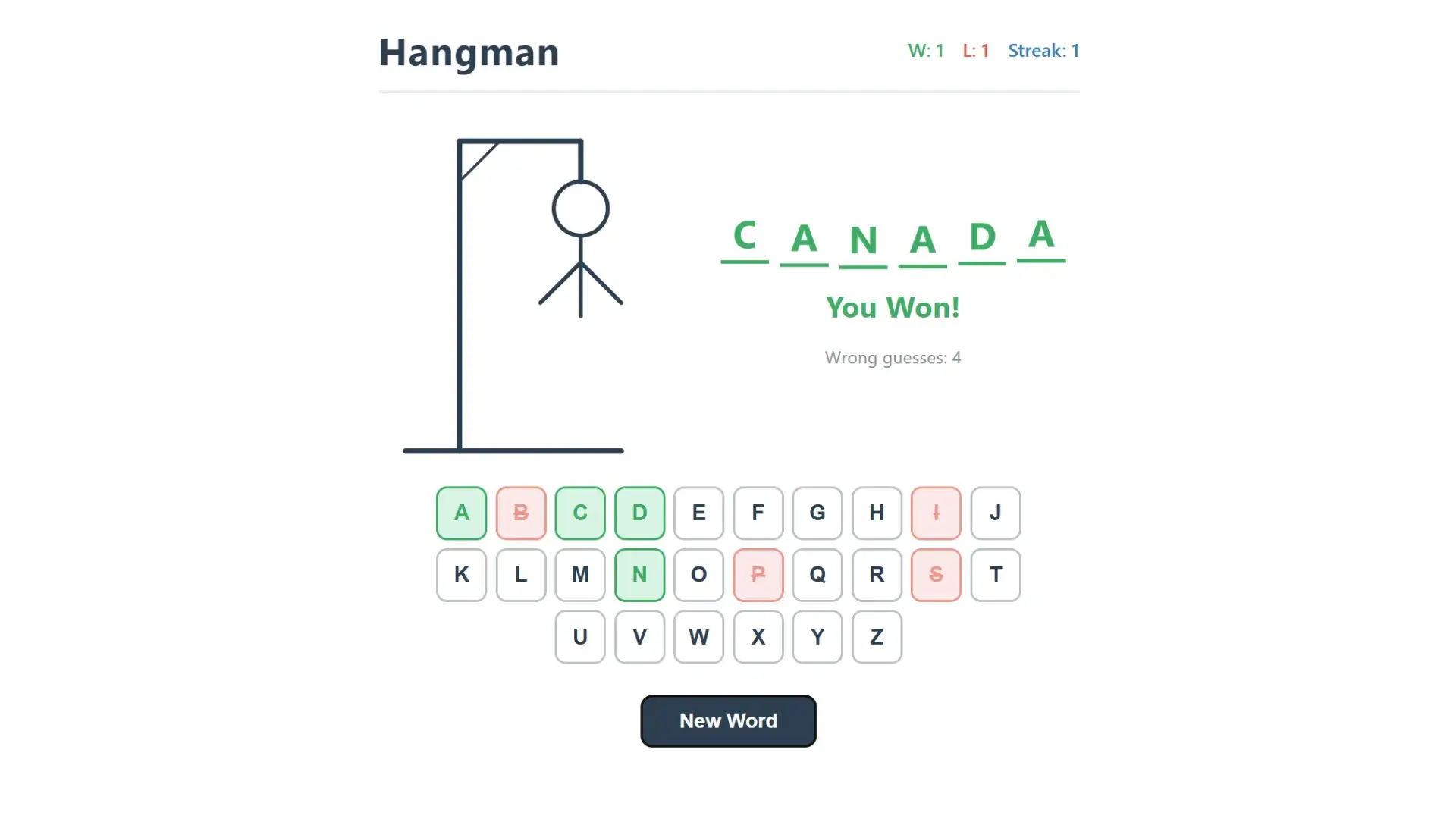
The rules are simple. The word appears as a row of blank dashes, one for each letter. You select a letter from the alphabet. If the letter exists in the word, it fills into the correct position. If not, you lose a guess and the hangman figure grows. Most versions allow six wrong guesses: head, body, two arms, two legs.
You can play a hangman word game on paper, on a whiteboard, or in a browser. The online version works exactly the same way. You click letter buttons instead of writing them. A guess the word game like this tests vocabulary, spelling, and pattern recognition.
The game has stayed popular for decades because it takes seconds to learn and works for any age group. Teachers use it for vocabulary drills. Friends play it to pass time. Parents use it to help kids practice spelling at home.
How Do You Build a Custom Hangman Game with AI?
MuleRun Chat builds a playable hangman game from a single text prompt. You type what you want, and the AI writes the HTML, CSS, and JavaScript, then publishes it to a live URL you can open on any device.
Here is how the process works:
- Open MuleRun Chat and describe the game you want: “Build a hangman game with animal-themed words and a blue background”
- The AI generates the full game code with a gallows drawing, alphabet keyboard, word display, and score tracker
- Review the result in the live preview
- Request changes: add more words, change colors, adjust the number of allowed guesses
- Publish the game to a shareable link
You do not need to write code or install anything. The entire build happens inside the chat window. The output from MuleRun Chat is a complete hangman game: you get the gallows visual, clickable letter buttons from A to Z, blank dashes for the hidden word, win/loss tracking, and a “New Word” button to reset.
You can create your own hangman game with a custom word list. Tell the AI which words to include. Vocabulary terms for a Spanish class, product names for a company training session, or holiday words for a seasonal party game all work. The AI builds the game around your exact list.
How the super agent assembles your game
When you submit a prompt, MuleRun Chat’s super agent reads skills.md files from specialized sub-agents. Each skills.md file defines a specific capability: one sub-agent handles the gallows drawing and letter keyboard, another manages word validation and guess tracking, another controls the visual styling and responsive layout. The super agent selects the relevant skills, coordinates their outputs, and assembles the final result into a single working page. This orchestration layer is why a plain text description produces a complete hangman game with functional code, score tracking, and interactive elements in one pass. The architecture runs on Anthropic’s Claude model, which powers the reasoning and code generation behind each sub-agent.
What Word Lists Can You Use?
You can use any word list: classroom vocabulary, foreign language terms, corporate training keywords, themed party words, or difficulty-tiered sets. MuleRun Chat lets you specify any set of words in your prompt, and the AI bakes them directly into the game.
Here are word list ideas organized by use:
- Classroom vocabulary: spelling words for grade 3, SAT prep terms, science terminology like “photosynthesis” and “mitochondria”
- Language learning: French food vocabulary, Japanese hiragana romanizations, Spanish verb conjugations
- Corporate training: product names, compliance terms, onboarding keywords for new hires
- Themed parties: Halloween words like “skeleton” and “cauldron,” holiday terms, birthday party vocabulary
- General difficulty tiers: easy words (3-4 letters), medium (5-6 letters), hard (8+ letters with uncommon letter patterns)
You control the difficulty by choosing words with rare letters. A word like “jazz” is harder than “apple” because the double Z and short length give fewer clues. Words with common letters (E, T, A, O) are easier to guess.
MuleRun Chat can also generate a random word list for you. Ask for “20 medium-difficulty English words” and the AI picks them automatically. You can review the list, swap out words you do not like, and regenerate.
Can You Make It Multiplayer or Competitive?
Yes. You can ask MuleRun Chat to add multiplayer features or competitive scoring to the hangman game.
Here are options you can request in your prompt:
- Turn-based two-player mode: one player enters a word, the other guesses it on the same screen
- Score leaderboard: track wins, losses, and streaks across multiple rounds (the base game already tracks W, L, and Streak)
- Timed rounds: add a countdown timer so players must guess before time runs out
- Difficulty levels: easy mode with 8 guesses, normal with 6, hard with 4
- Category selection: let the player choose a word category before each round
For multiplayer word games online, you share the published game link with other players. Everyone opens the same URL in their browser. The turn-based version works best for classroom settings: one student picks the word, the other guesses.
A classroom game version can include a word bank visible to the teacher but hidden from students. The teacher selects words from a curriculum-aligned list. Students take turns guessing. This turns a simple hangman game into a structured vocabulary review exercise.
All of these features come from editing your prompt in MuleRun Chat. You describe the feature, and the AI adds it to the existing game.
Create Your Own Hangman Game
Build your own hangman word game with the hangman template in MuleRun Chat. Sign up for free credits to start building.
See more use cases.
Frequently Asked Questions
Is the hangman game free?
Yes. MuleRun Chat gives you free credits when you sign up. You can build and publish a hangman game without paying anything.
Can I use my own word list?
Yes. Type your words into the prompt and the AI builds the game around them. You can include as many or as few words as you want.
Does it work on phones?
Yes. The game runs in any mobile browser. The letter buttons and word display resize to fit smaller screens.
Can I use this in a classroom?
Yes. Teachers can create custom word lists matching their curriculum. Students open the game link on any device. It works as a vocabulary drill or a classroom game for group review.
How many wrong guesses are allowed?
The default is six wrong guesses, matching the classic hangman rules (head, body, two arms, two legs). You can ask MuleRun Chat to change this number in your prompt.