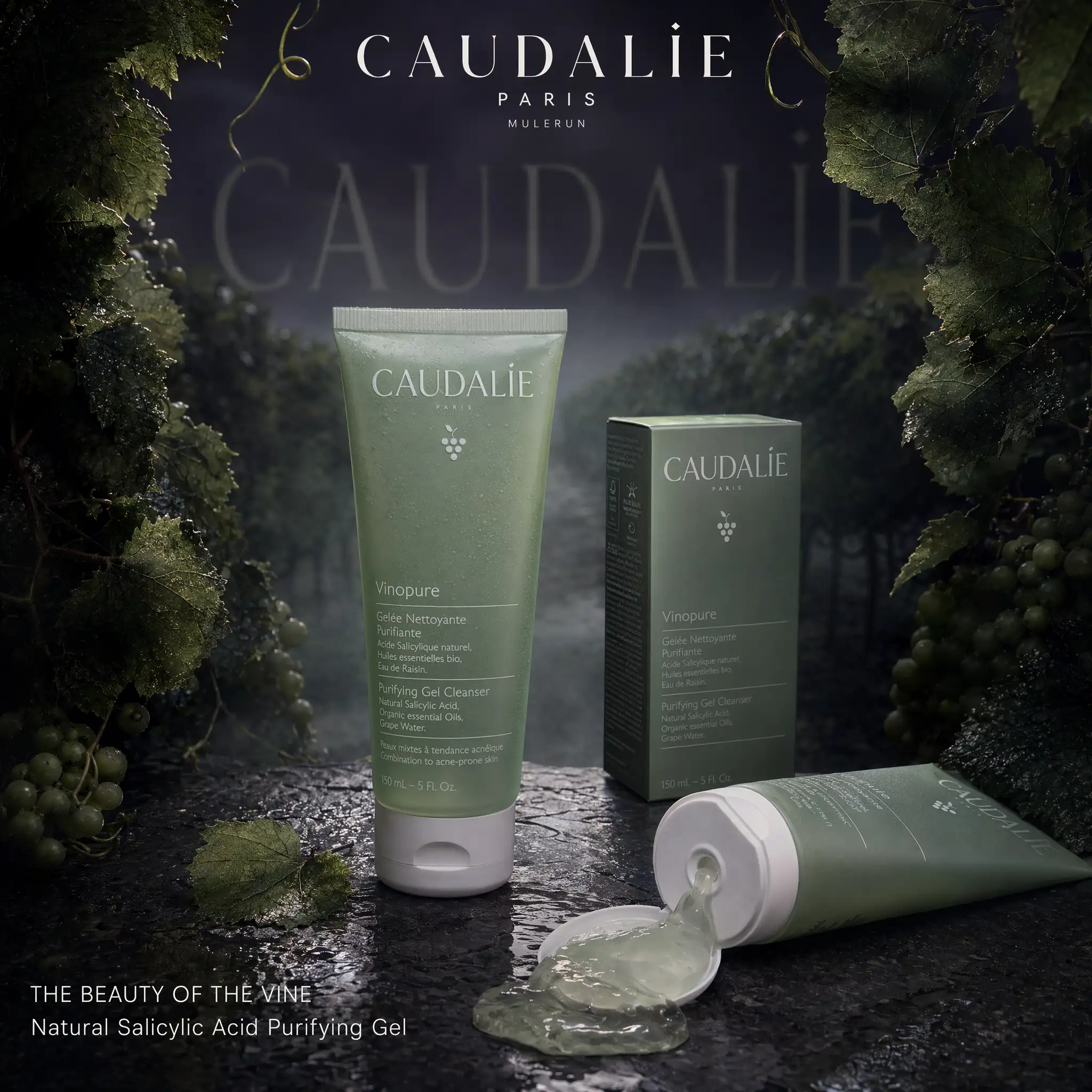
I typed one prompt into MuleRun Chat and got a cinematic product advertisement that looks like it came out of a studio with a five-figure budget. Dark botanical environment, perspective typography fading into mist, wet stone reflections, rim-lit product tubes. The whole thing generated in under five minutes from text alone.
This is the prompt format that designers and ecommerce sellers on X are using right now to generate commercial-quality product ads without a photographer, a studio, or an agency. The format was first shared by Diplomeme on X and has since spread across the AI design community. It works for skincare, FMCG, beauty, food, and any physical product with strong packaging.
Here is the exact prompt structure, how to adapt it for your own products, and what each layer controls in the final output.
What Is a Cinematic Product Ad Prompt?
A cinematic product ad prompt is a structured text instruction that tells an AI image generator exactly how to compose a commercial-quality product advertisement. It specifies the product placement, environment, lighting, typography, surface, and color palette in a single block so the output looks like a professional studio shoot rather than a generic product photo.
The format follows a 10-section structure. Each section controls a different visual layer of the final image. Skip a section and the AI defaults to something generic. Include all ten and the output reads as a real advertisement.
Here is the structure:
- Product placement: how many units, which are open or closed, where the packaging sits
- Branding: logo position, wordmark style, secondary attribution
- Environment: the physical setting behind and around the product
- Lighting: key light direction, rim color, ambient fill
- Perspective typography: large semi-transparent brand name extending into the background
- Secondary typography: taglines in clean brand-appropriate type
- Surface: what the product sits on
- Color palette: 2-3 colors plus black
- Mood: the emotional tension the image should carry
- Technical directives: aspect ratio, finish quality, exclusions
This structure was developed by Diplomeme and demonstrated across FMCG brands including Himalaya, Garnier, Nivea, and Pond’s. The original prompts are adapted here with full credit and source links.
How Do You Create Ecommerce Product Photography With AI?
Ecommerce product photography with AI starts with a reference prompt that describes the physical product, its environment, and the camera and lighting conditions. The output replaces a traditional studio shoot for product listings, social ads, and campaign visuals.
The key difference between a generic product image and one that converts is the surface and lighting specification. These two layers determine whether the result looks like a stock photo or a commercial shoot.
Here is a complete prompt for a skincare product ad, adapted from the Caudalie Vinopure session generated in MuleRun Chat:
Cinematic moody FMCG advertisement, Caudalie Vinopure Pore Purifying Gel Cleanser, one upright squeeze tube with translucent sage-green body and matte white cap standing slightly left of center, one open tube laid at a natural angle with clear pale-green purifying gel pooling gently from the nozzle, Caudalie Vinopure product box placed behind at a slight diagonal angle showing the front panel with the grape-cluster icon and "CAUDALIE" wordmark in uppercase elegant thin serif

branding (top center): "CAUDALIE" wordmark in uppercase thin elegant serif tracking wide, "PARIS" directly beneath in small spaced sans-serif capitals

environment: dark French vineyard interior at dusk, mature grapevine branches with broad textured vine leaves in deep matte green curling inward from both sides, loose grape tendrils hanging into frame from above, clusters of small unripe green grapes partially hidden in shadow, subtle cool evening mist drifting low between the vine stems, a single unfocused vineyard row disappearing into deep background darkness

lighting: low-key cinematic, single soft overhead key light angled slightly forward casting controlled highlights on the tube cap and gel surface, deep sage-green rim light tracing the edges of the vine leaves from behind, faint cool ambient fill from below lifting the darkest shadow areas just enough to preserve texture detail, no harsh specular, all transitions soft and painterly

perspective typography (primary): large semi-transparent "CAUDALIE" in the brand's own uppercase thin serif typeface extending deep into the background along the vineyard row vanishing point, letterforms softly diffused and partially occluded by foreground vine leaves and mist, opacity fading from 40% in the midground to 10% at the deepest point

secondary typography (clean brand font):
"THE BEAUTY OF THE VINE"
"Natural Salicylic Acid Purifying Gel"

surface: dark wet natural slate with fine grain texture visible, thin film of water creating a subtle broken reflection of the tube and box, a single small vine leaf resting flat on the stone surface near the base of the upright tube

color palette: deep grape purple (#2B1C45), muted botanical sage green, charcoal black, cool stone grey

ultra-realistic, premium editorial finish, no watermark, no extra text beyond specified typography, 1:1
To adapt this for your own product, replace three things: the product description (tube shape, color, cap material), the environment (match it to the product’s ingredient story or brand world), and the color palette (pull the brand’s primary and secondary colors).
Product photography for ecommerce works best when the environment tells the ingredient or origin story. A honey-based skincare line gets warm amber candlelight on raw wood. A charcoal cleanser gets matte black surfaces with sharp directional light. The environment is not decoration. It is context that makes the product believable.
What Are the Best AI Prompts for Beauty Product Photography?
The best AI prompts for beauty product photography specify three layers that most generic prompts skip: the surface material, the lighting direction, and a negative prompt that excludes common AI failures like blurry labels and duplicate products.
Beauty products need macro-level detail on textures. Gel pooling from a tube, serum droplets on glass, cream swirled at the nozzle. These details are what separate an AI-generated product photo from a placeholder.
Here is the original FMCG prompt format by Diplomeme on X, shown for four different brand environments. Each prompt changes only the product, environment, and palette while keeping the structural format identical:
Himalaya Neem (Dark Botanical)
Cinematic moody FMCG advertisement, Himalaya Neem Face Wash, one upright tube + one open tube with gel visible, product box placed behind at slight angle

branding (top center): Himalaya logo

environment: dark botanical setting, deep green leaves fading into shadow, subtle mist

lighting: low-key cinematic, soft top light with green rim highlights

perspective typography (primary): large semi-transparent "HIMALAYA" extending deep into background, softly diffused and interacting with leaves

secondary typography (clean brand font):
"PURE HERBAL CARE"
"Neem Powered Clean"

surface: dark wet stone, subtle reflection

color palette: deep green, black

ultra-realistic, premium finish, 1:1
Garnier Men (Cold Aqua)
Cinematic moody FMCG advertisement, Garnier Men Oil Clear Face Wash, one upright tube + one open tube with gel spill, box behind

branding (top center): Garnier logo

environment: dark aqua atmosphere, floating droplets, light mist

lighting: cold cinematic, blue rim highlights, deep contrast

perspective typography (primary): bold translucent "GARNIER" stretching into depth, interacting with water particles

secondary typography:
"OIL CONTROL"
"ICY CLEAN FORMULA"

surface: reflective wet base

palette: deep blue, cyan, black

ultra-detailed liquid realism, 1:1
Nivea Men Charcoal (Deep Black)
Cinematic moody FMCG advertisement, Nivea Men Charcoal Face Wash, one upright tube + one open tube with charcoal gel visible, box behind

branding (top center): Nivea logo

environment: deep black charcoal setting, minimal haze

lighting: sharp directional light, strong highlights, deep shadows

perspective typography (primary): matte "NIVEA" extending backward in perspective, bold and controlled

secondary typography:
"DEEP CLEAN"
"CHARCOAL POWER"

surface: matte black with subtle reflection

palette: black, grey, deep blue

ultra-realistic product finish, 1:1
Pond’s Bright Beauty (Warm Glow)
Cinematic moody FMCG advertisement, Pond's Bright Beauty Face Wash, one upright tube + one open tube with cream visible, box behind

branding (top center): Pond's logo

environment: dark backdrop with soft warm orange glow diffusion

lighting: soft cinematic highlights, warm tone

perspective typography (primary): glowing "POND'S" extending into depth, soft diffusion

secondary typography:
"BRIGHT GLOW"
"VITAMIN INFUSED CARE"

surface: glossy dark base with reflection

palette: black, warm orange, white

ultra-clean premium rendering, 1:1
Source: all four prompts adapted from Diplomeme on X. Original demonstrations showed these prompts generating commercial-grade FMCG ads from text alone.
The pattern is consistent across all four: the environment color matches the product’s active ingredient story, and the perspective typography anchors the brand name as a spatial element in the scene rather than a flat overlay.
How Do You Create Posters and Ads for Products Without a Studio?
You create posters and ads for products without a studio by writing a prompt that specifies what a studio photographer would normally control: the surface, the light source direction, the background depth, and the aspect ratio. The AI handles the rendering.
The prompt format above works for standard product ads at 1:1 for social feeds and 4:5 for Instagram portrait placements. For wider campaign posters, adjust the aspect ratio to 16:9 and expand the environment description to fill the horizontal space.
For product photography for online stores, the key adjustment is simplification. Ecommerce listings need clean backgrounds and clear product visibility. Strip the environment down to a single surface and a gradient background. Keep the lighting specification but remove the perspective typography and mist. The result is a clean commercial product shot that works for Shopify, Amazon, or any product listing page.
Here is a minimal ecommerce variant:
Commercial product photograph, [PRODUCT NAME], single product centered on [SURFACE: polished white marble / matte concrete / light oak wood], clean gradient background from [COLOR] to soft white, soft diffused studio lighting from above and left, subtle contact shadow, product label fully legible and sharp, no text overlays, no extra props, ultra-realistic, 1:1
This stripped-down version produces product photography for ecommerce that looks like a standard commercial shoot. Add one prop (a single leaf, a citrus slice, a fabric swatch) to shift it from catalog to lifestyle without losing the clean composition.
How Do You Build a Product Ad Campaign From One Prompt?
You build a product ad campaign from one prompt by writing a master prompt once and changing only the product variant, season, or angle for each new image. The lighting, surface, typography style, and color system stay locked across every generation.
The Caudalie prompt above is a master prompt. To extend it into a campaign:
- Product line extension: swap Vinopure Gel Cleanser for Vinopure Serum, Vinopure Toner, Vinopure Moisturizer. Change only the product description line. Everything else stays identical
- Seasonal variation: change “cool evening mist” to “warm golden afternoon light through vineyard canopy” for a summer variant. The environment shifts but the surface, typography, and palette hold
- Platform adaptation: change “1:1” to “9:16” for Instagram Reels and TikTok. Change to “16:9” for YouTube thumbnails and display banners. Set the aspect ratio before generating to avoid cropping after
The discipline is keeping the brand layer (typography, surface, palette, lighting style) constant while rotating the variable layer (product, season, angle). This is how a single prompt becomes a 12-image campaign with visual consistency across every output.
MuleRun Chat runs this workflow in a single session. Upload a product reference image, paste the master prompt, generate, then swap the product line and generate again. The session context carries the brand layer forward so each generation builds on the last.
Start Building
Sign up for free credits and generate your first product ad through this template.
Frequently Asked Questions
What AI Model Works Best for Product Ad Photography?
Image models with strong text rendering produce the best product ads because packaging labels need to be legible. MuleRun Chat routes to the best available model automatically, including GPT Image 2 and Nano Banana 2, both of which handle product label text accurately.
Can AI Replace a Product Photography Studio?
For social media ads, product listings, and campaign concepts, yes. AI-generated product photography produces commercial-quality output for ecommerce and digital advertising. Physical catalog shoots and packaging photography for print still benefit from a real camera for color accuracy at press resolution.
How Do You Make the Product Label Readable in AI Images?
Specify the exact brand name in quotes inside the prompt, describe the font style (serif, sans-serif, condensed), and include “product label fully legible and sharp” in your technical directives. Adding “no blurry text, no distorted logos” as a negative instruction further improves label accuracy.
What Aspect Ratio Should You Use for Product Ads?
Use 1:1 for Instagram feed and Facebook posts. Use 9:16 for Instagram Reels, TikTok, and YouTube Shorts. Use 4:5 for Instagram portrait placements. Use 16:9 for YouTube thumbnails and display banners. Set the ratio before generating to avoid cropping.
How Many Product Ad Variations Can You Generate From One Prompt?
A single master prompt can produce an entire product line campaign. Change only the product name, variant color, or seasonal environment while keeping the lighting, surface, typography, and palette locked. One prompt session in MuleRun Chat can generate 10-15 consistent campaign images.