
What Is an AI Photo Booth and Why Does It Make a Good Mother’s Day Gift?
An AI photo booth works like the photo strip machines at arcades and malls, except it runs in your browser. You open a link, your webcam turns on, and you take a set of photos that get arranged into a decorated strip. No app download, no coin slot, no waiting in line.
The AI part is how the booth itself gets built. Instead of downloading someone else’s photo booth app, you describe what you want and MuleRun Chat generates the entire web page: the camera interface, the countdown timer, the strip layout, the decorations. The result is a photo booth that looks and feels custom because it is.
As a Mother’s Day gift, it works on two levels. First, the photo strip itself is the gift: four photos of you (or you and your siblings, your kids, your family) arranged with floral borders, a personal Mother’s Day message, and a “Happy Mother’s Day” header. Second, the experience is the gift: your mom opens a link, takes the photos herself, and downloads her own strip. It is more interactive than a Mother’s Day card and more personal than most items on a best Mother’s Day gifts list.
How Do You Use the Mother’s Day Photo Booth?
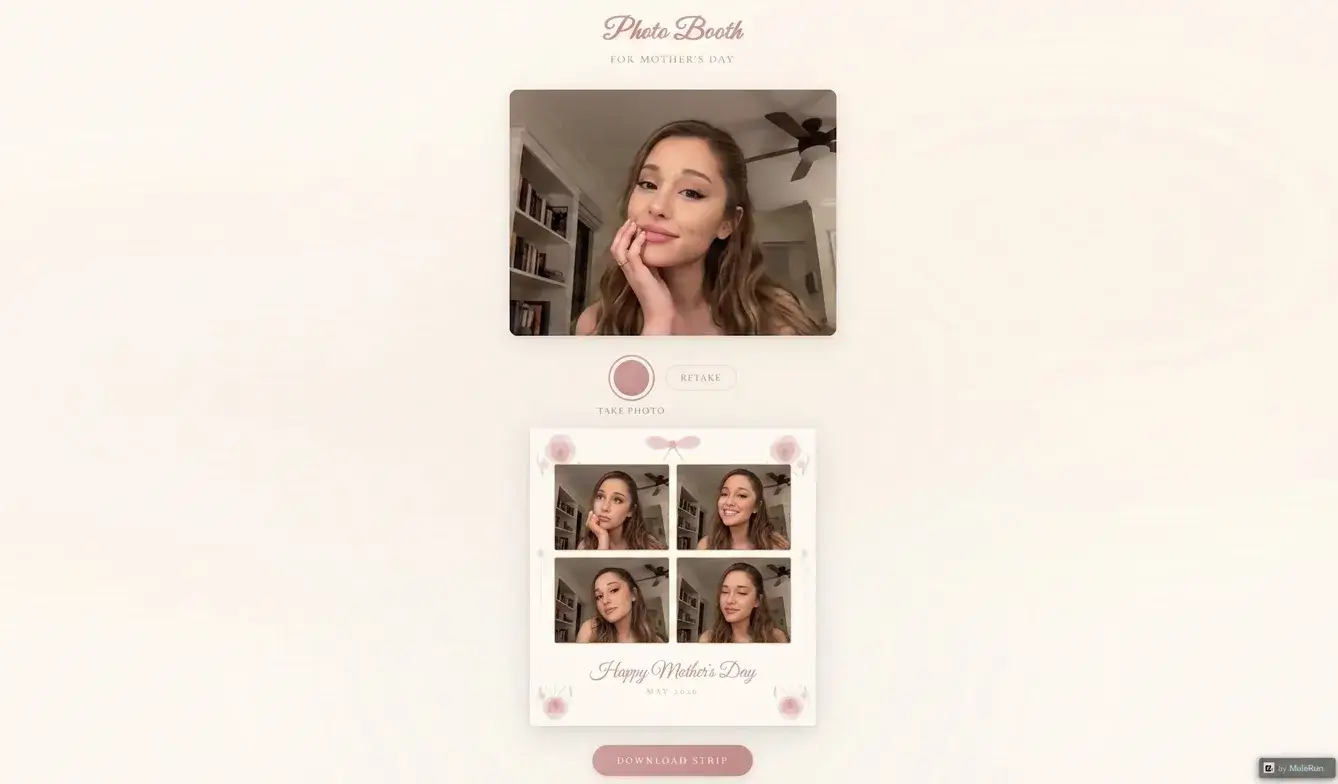
The booth takes about 30 seconds to use from start to finish:
- Open the link on any device with a camera (phone or laptop both work)
- Allow camera access when your browser asks
- Tap “TAKE PHOTO” to start the sequence
- Pose for 4 photos with a 3-second countdown between each shot
- Review your photo strip with the decorative frame, floral corners, and Mother’s Day message
- Tap “RETAKE” if you want to try again, or “DOWNLOAD STRIP” to save the PNG
The strip comes out as a 2x2 grid with peony illustrations in the corners, a ribbon bow at the top, gold-bordered photo cells, and “Happy Mother’s Day” in cursive at the bottom. The date stamp reads “MAY 2026” so your mom knows exactly when it was made.
You send the link to your mom and she takes her own photos. Or you take photos together and download the strip to print or text to her. Either way works.
What Makes This Different from Regular Photo Booth Apps?
Photo booth apps on the App Store give you a fixed set of templates. You pick a frame, take your photos, and the app overlays the design. The frames are the same ones available to every other user.
An AI photo booth built with MuleRun Chat is different in three ways:
- You design the frame: describe the border style, flower type, color palette, and message text in your prompt
- No app required: the booth runs as a web page in any browser, on any device, and your mom does not need to install anything
- You own the code: the generated page is yours to host, share, modify, or reuse next year with a different message
The Korean-style photo booth trend popularized the 2x2 strip format with decorative borders. This takes that same aesthetic and lets you customize every element through a text description instead of choosing from preset options.
Can You Customize the Photo Strip Design?
Every visual element comes from your prompt. Here are variations you can request:
- Different flowers: replace peonies with roses, tulips, cherry blossoms, or lavender
- Color schemes: swap cream and pink for navy and silver, pastel rainbow, or your mom’s favorite colors
- Layout: change from 2x2 grid to a vertical 4x1 classic strip, or a 3-photo layout with a larger center image
- Text: add specific Mother’s Day quotes, a family inside joke, or a Mother’s Day message in another language
- Extras: add a QR code that links to a video message, include the family name, or add a countdown to Mother’s Day 2026
To build a custom version, open the template in MuleRun Chat and describe your changes. The AI regenerates the page with your specifications. Each version gets its own shareable link.
How Do You Build Your Own AI Photo Booth from Scratch?
If you want to go beyond the Mother’s Day template and build a photo booth for a different occasion, the process is the same:
- Open MuleRun Chat
- Describe the booth: “Build a photo booth web page that accesses the webcam, takes 4 photos with a countdown, and arranges them in a strip with [your decorations]”
- Specify the theme: birthday, graduation, wedding, baby shower, or any event
- Add interactive elements: filters, stickers, background removal, or themed overlays
- Generate and share the link
The same tool that builds a Mother’s Day card can build a photo booth, a quiz, a countdown timer, or any interactive web page. You describe it, the AI codes it.
Make Your Mom’s Photo Strip Now
Open the Mother’s Day Photo Booth and take your photos. Send the link to your mom so she can make her own strip too.
Want to build a custom version? Use the photo booth template in MuleRun Chat to design your own layout, colors, and decorations.
See more use cases.
Frequently Asked Questions
Is the AI photo booth free to use?
Yes. Open the link in any browser, take your photos, and download the strip. No account or app needed.
Does my mom need to install an app to use it?
No. The photo booth runs as a web page in any browser on phone or laptop. Just share the link.
Can I customize the photo strip design?
Yes. Use the template in MuleRun Chat to change flowers, colors, layout, text, and decorations through a text description.
How many photos does the booth take?
Four photos with a 3-second countdown between each. The photos arrange into a 2x2 decorated strip.
Can I use this for events other than Mother’s Day?
Yes. Describe any theme in MuleRun Chat, such as birthday, wedding, or graduation, and it generates a custom photo booth page.