A thread on X by @0xbisc called “Into the Swing-Verse” showed AI-generated character design sheets animated into Spider-Verse style action clips, collecting 44.9K views, 1K likes, and 877 bookmarks.
The pipeline starts with a character concept sheet and ends with a cinematic animation sequence. You can run the same pipeline from one prompt in MuleRun Chat. The VERTEX character below went from a single concept sheet to a 15-second action sequence with five scene transitions in one session.
What Is an AI Character Description Generator?
An AI character description generator is a tool that creates complete character concept sheets from text descriptions, including visual design, expressions, action poses, gear breakdowns, backstory, and personality traits. These sheets serve as the visual foundation for AI animation pipelines.
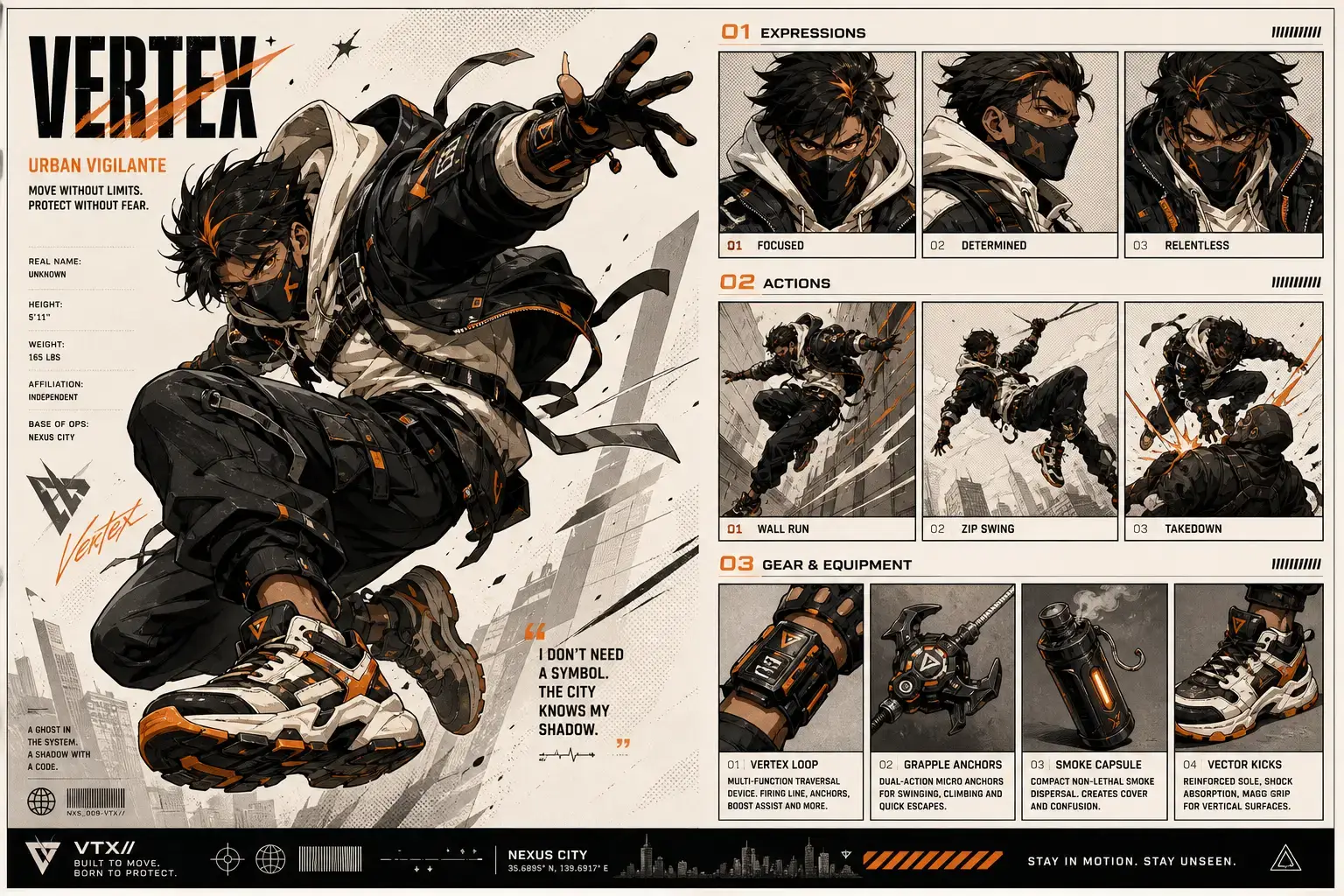
The VERTEX character sheet demonstrates what a complete AI-generated concept sheet looks like in practice:
- Expressions panel: three distinct emotional states (Focused, Determined, Relentless) showing how the character looks under different conditions
- Actions panel: three signature moves (Wall Run, Zip Swing, Takedown) demonstrating the character’s movement vocabulary
- Gear and equipment: four items with functional descriptions (Vertex Loop for traversal, Grapple Anchors for climbing, Smoke Capsule for cover, Vector Kicks for vertical surfaces)
- Character stats: identity details (Real Name: Unknown, Height: 5'11", Weight: 165 lbs, Affiliation: Independent, Base of Ops: Nexus City) that ground the character in a specific world
- Brand identity: VTX// logo, tagline “Built to Move. Born to Protect,” and character quote “I don’t need a symbol. The city knows my shadow”
A structured character sheet matters for animation because the AI video model needs consistent visual references to maintain identity across frames and scenes. Without a detailed sheet, the model generates inconsistent character appearances between shots. The expressions panel tells the model what the face looks like under different lighting and emotion. The actions panel establishes the character’s silhouette during motion. The gear panel ensures equipment stays consistent across every frame of the animated sequence.
How Do You Turn a Character Sheet Into a Spider-Verse Animation?
You turn a character sheet into a Spider-Verse animation by feeding the concept sheet image into an image-to-video model with a cinematic prompt that specifies scene transitions, camera movement, and the 2.5D comic animation style.
The pipeline has two steps:
- Step 1: generate the character concept sheet: describe the character in detail (appearance, gear, personality, world) and the AI character description generator produces a structured sheet with expressions, actions, and equipment panels
- Step 2: feed the sheet into the video model: input the character sheet image into Happy Horse 1.0 I2V with a prompt that specifies the action sequence
Here is the prompt used for the VERTEX animation:
15-second continuous action sequence in Spider-Verse 2.5D style. The character from the reference image performs a cinematic sequence: pagoda rooftop freefall with cape physics, grappling hook swing through neon-lit streets with motion blur, holographic billboard impact with comic-style KRACK onomatopoeia effect, train tunnel chase with dramatic color inversion, and final rooftop landing freeze-frame. Halftone dot shading, stepped-frame animation (animate on 2s), chromatic aberration on edges, bold ink outlines, dynamic camera tracking with depth-of-field shifts between foreground action and city background. 1080P resolution.
Model: Happy Horse 1.0 I2V (Alibaba Cloud) Settings: –resolution 1080P –duration 15
Try it yourself with this template.
What Makes the Spider-Verse Animation Style Work in AI Video?
The Spider-Verse animation style works in AI video because its defining visual elements (halftone shading, stepped frames, chromatic aberration, ink outlines) are stylistically forgiving: imperfections in AI generation look intentional rather than broken.
Five defining elements make this style uniquely compatible with AI video generation:
- Halftone shading: dot-pattern shading that mimics printed comic book pages. AI models reproduce this consistently because it is a pattern-based texture, not a detail-dependent rendering
- Stepped-frame animation: deliberately dropping frames to create the choppy, hand-drawn feel. Traditional animation calls this animating on 2s or 3s (drawing every second or third frame instead of every frame). AI video naturally produces slight frame inconsistencies, and the stepped-frame style absorbs those as intentional
- Chromatic aberration: RGB color offset at edges that simulates print registration errors from old comic book printing. This is a simple post-processing effect that AI models handle reliably
- Ink outlines: bold black outlines on characters and environments that define shapes clearly. These outlines help the AI maintain consistent character silhouettes even when details shift between frames
- 2.5D depth: flat comic-style elements layered with 3D camera movement, creating parallax between foreground and background layers
This combination of stylistic choices makes Spider-Verse the most forgiving aesthetic for AI animation. Photorealistic styles expose every AI artifact. Comic styles absorb them.
How Does Happy Horse Compare to Other AI Animation Models?
Happy Horse 1.0 is one of several image-to-video models capable of character-to-animation conversion, with specific strengths in identity preservation across extended sequences and cinematic motion quality at 15-second duration.
| Feature | Happy Horse 1.0 | Seedance 2.0 | Kling 2.0 | Veo 3 |
|---|---|---|---|---|
| Input type | Single image | Single image | Single image | Text or image |
| Max duration | 15 seconds | 10 seconds | 10 seconds | 8 seconds |
| Resolution | 1080P | 1080P | 1080P | 4K |
| Character consistency | Strong (identity-preserving I2V) | Strong | Moderate | Moderate |
| Comic/2.5D style handling | Excellent | Excellent | Good | Good |
| Provider | Alibaba Cloud | ByteDance | Kuaishou | Google DeepMind |
MuleRun Chat provides access to multiple models, so you can test the same character sheet and prompt across different generators to compare results.
- Happy Horse 1.0: 15-second max duration is the longest in this comparison, making it the best fit for multi-scene action sequences
- Seedance 2.0: strong 2.5D handling and the model behind many viral Spider-Verse clips on TikTok
- Kling 2.0: good general-purpose video generation but less specialized for comic styles
- Veo 3: highest resolution (4K) but shorter duration and text-to-video capability that Happy Horse and Seedance lack
How to Make a Short Movie From AI Character Sheets
You make a short movie from AI character sheets by chaining multiple animated sequences from the same character sheet into a narrative structure with scene transitions, dialogue overlays, and sound design.
- Scene planning: break the story into 15-second segments, each with its own prompt. A 2-minute short movie requires 8 segments
- Character consistency: use the same character sheet as input for every scene to maintain visual identity across the entire film. The sheet acts as the casting reference that keeps the character recognizable
- Narrative structure: opening hook, rising action, climax, resolution. The same structure as traditional short filmmaking, just built from AI-generated clips instead of filmed footage
- Post-production: stitch clips together in any video editor, add music, sound effects, and dialogue. Free tools like DaVinci Resolve or CapCut handle this without paid software
- Distribution: TikTok (vertical 9:16 clips posted as a series), YouTube Shorts, Instagram Reels for short-form, or full horizontal 16:9 format for YouTube and Vimeo
Start Building
Sign up for free credits and create your character animation from one prompt.
Frequently Asked Questions
Do I Need Drawing Skills to Create an AI Character Design Sheet?
No. You describe the character in text: appearance, personality, gear, backstory. The AI generates the visual concept sheet from your description.
Can I Use the Same Character Sheet for Multiple Animation Styles?
Yes. The same sheet works as input for Spider-Verse 2.5D, anime, photorealistic, or any other style. Change the style keywords in the video prompt while keeping the character sheet identical.
What Resolution Should My Character Sheet Image Be?
At least 1024x1024 pixels for clean detail. Higher resolution gives the video model more visual information to preserve character identity across frames.
How Long Can an AI-Generated Animation Clip Be?
Happy Horse 1.0 generates up to 15 seconds per clip. Chain multiple clips together in a video editor to build longer sequences.
Can I Combine Clips From Different AI Models Into One Short Movie?
Yes. Generate different scenes with different models and edit them together. Maintaining the same character sheet as input across all models helps preserve visual consistency.