Why Do Seniors with Dementia Need Specially Designed Activities?
Seniors with dementia need specially designed activities because standard digital games rely on speed, scoring, and escalating difficulty, all of which create anxiety rather than engagement. The goal for this population is not winning or losing. The goal is keeping hands busy, sparking a memory, hearing a familiar melody, or recognizing a color. Cognitive stimulation research from the Alzheimer’s Association shows that sensory activities reduce agitation and improve mood in people with moderate to severe dementia.
A calming activity hub removes time pressure, failure states, and complex navigation. Every interaction produces a positive response. There is no wrong answer, no countdown, and no game-over screen.
What Activities Are Included in the Hub?
The Activity Corner hub contains four activities for seniors with dementia. Each one targets a different cognitive channel: visual memory, language recall, color recognition, and auditory stimulation. A caregiver can open any activity with a single tap.
Match the Pairs
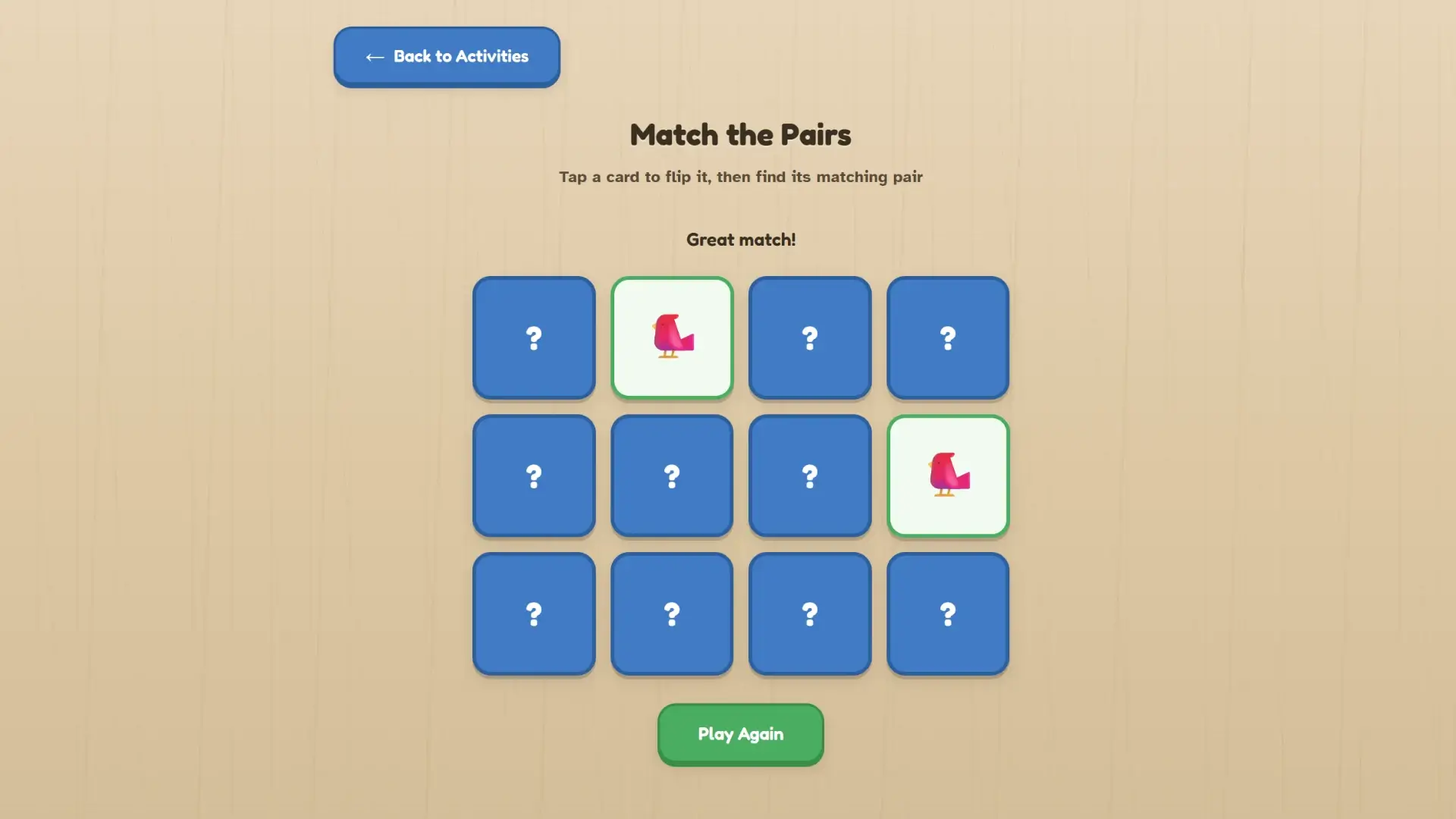
Twelve cards appear face-down in a grid. Each card shows a familiar emoji: a bird, a sunflower, a cat, a coffee cup, a house, or a rose. The player taps a card to flip it, then taps another card to find the matching picture. Matched pairs stay visible. Unmatched cards flip back over gently. This works as a calming alternative to puzzles for seniors because there is no timer and no move counter. Unlike games like Sudoku that require logical deduction under pressure, this matching game rewards recognition of familiar objects. The emoji images are large and high-contrast, so players with reduced vision can still participate.
Finish the Saying
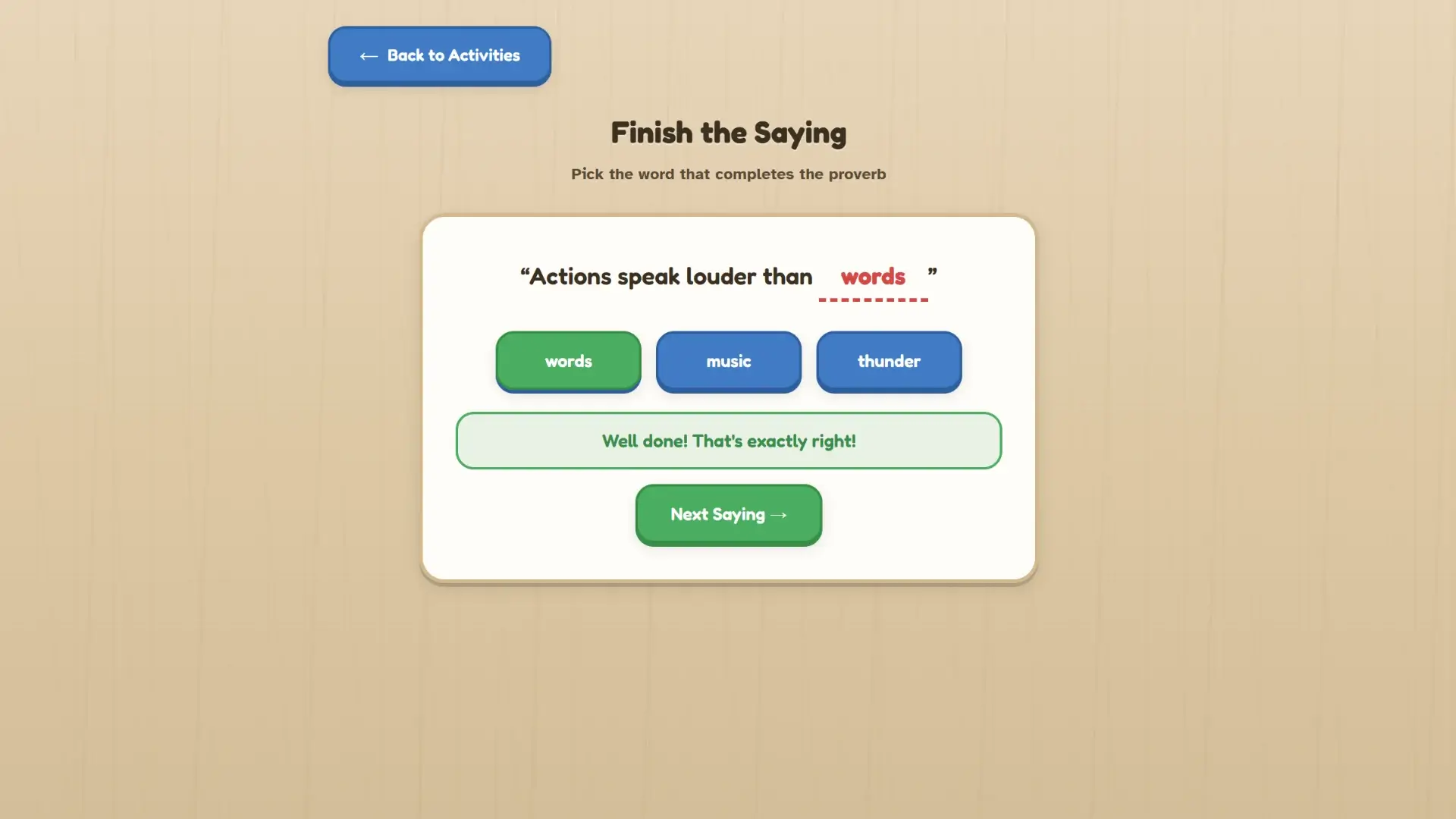
A well-known proverb appears with the final word missing. The player picks the correct word from a set of options. Proverbs stored in long-term memory often remain accessible even in later stages of dementia, so this activity connects to language pathways that other activities cannot reach. The interface shows large text with clear spacing between options. Selecting any answer produces a positive visual response. The activity cycles through multiple proverbs so the session can continue as long as the player stays engaged.
Name That Color
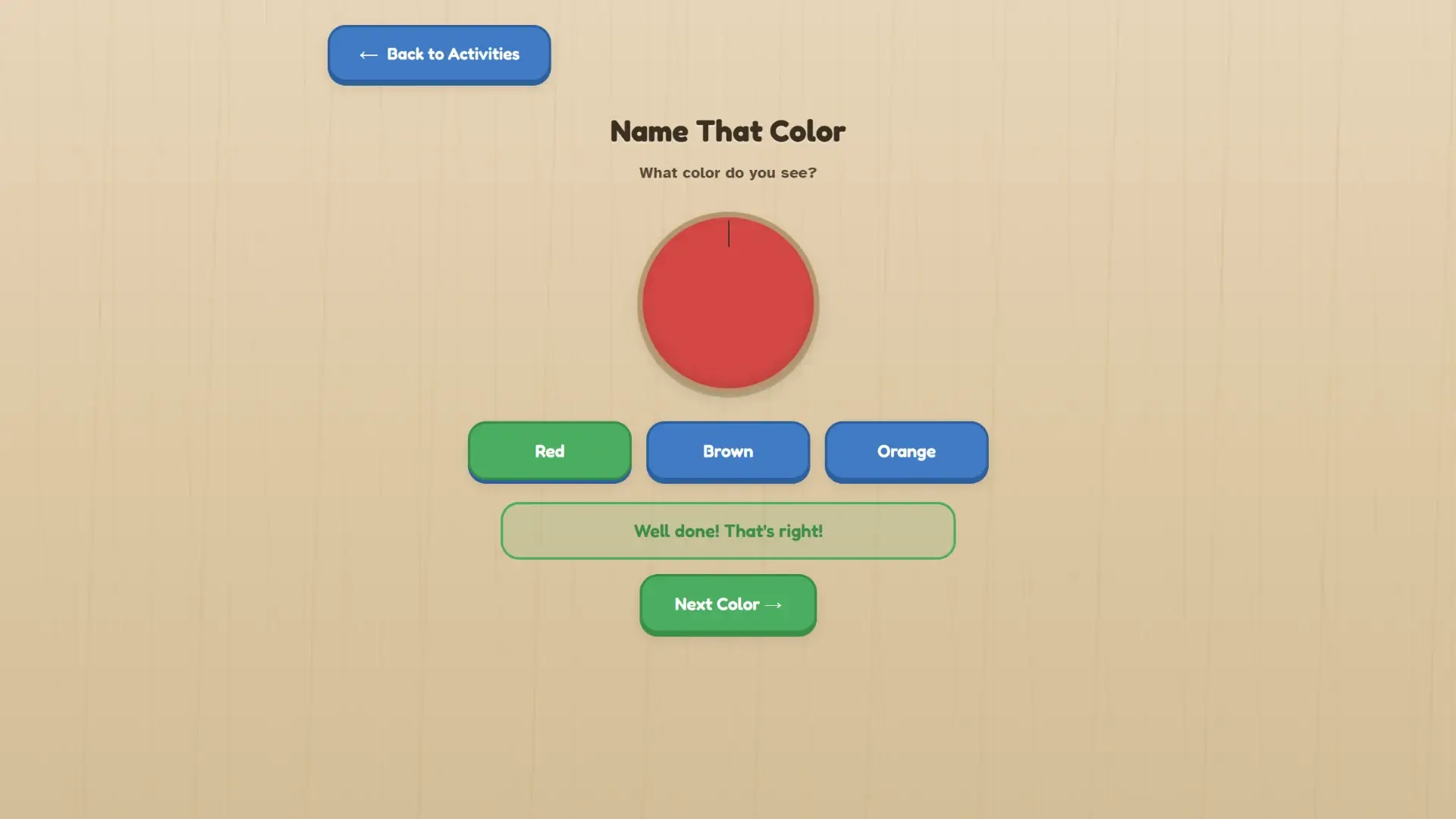
A solid color fills the screen and the player identifies it from a set of labeled options. Color naming draws on a different part of the brain than word recall or pattern matching. It activates visual processing and vocabulary simultaneously. The colors are primary and secondary: red, blue, green, yellow, orange, purple. No ambiguous shades like teal or mauve. The large color swatch and simple labels reduce cognitive load to the minimum needed for participation.
Music Memory
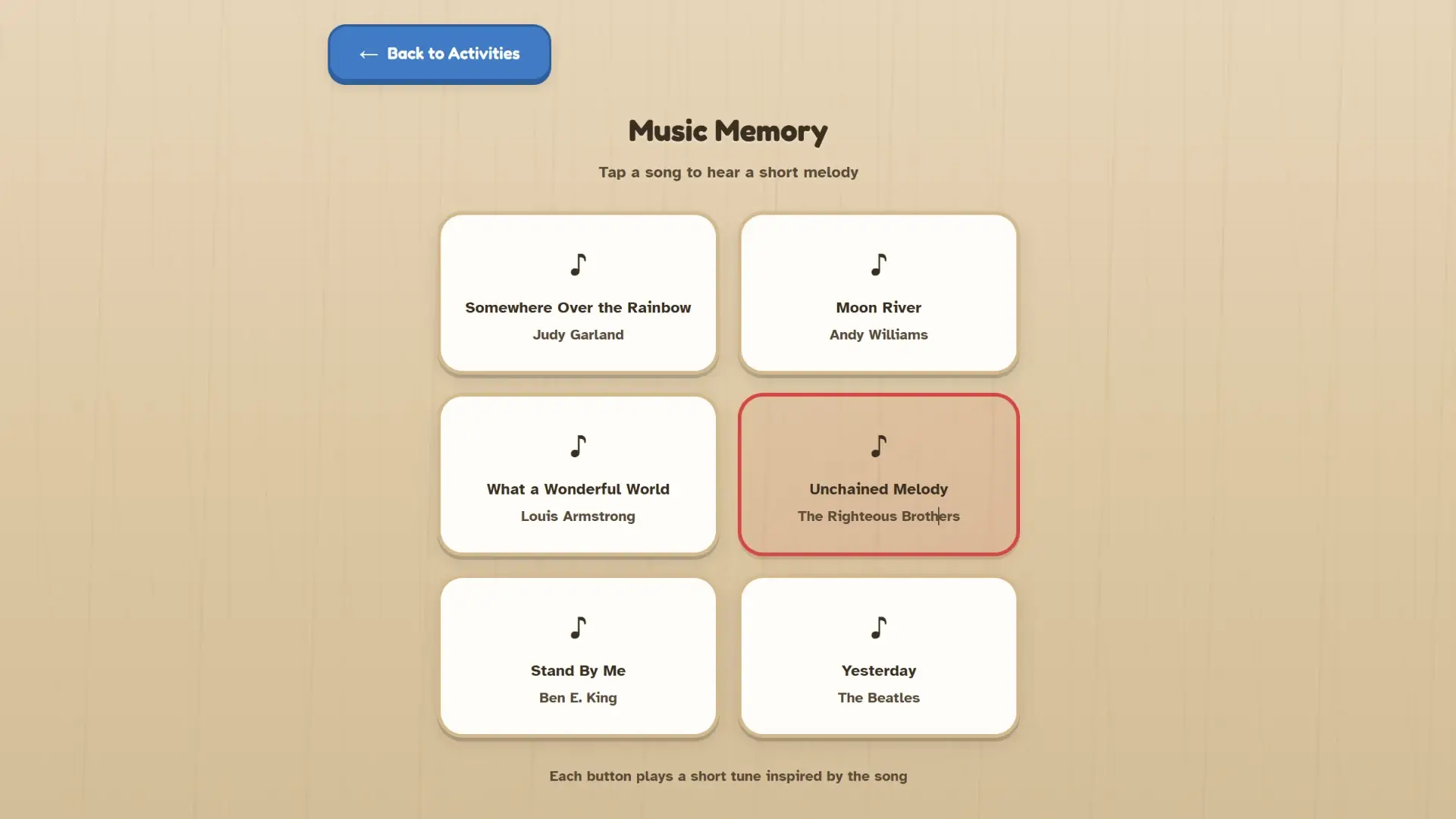
Song titles appear as tappable buttons. Each button plays a short melody inspired by the named song. Music triggers emotional memory even when other recall pathways have declined, making this the most emotionally engaging activity in the hub. The player does not need to answer questions or make choices. Tapping a button and hearing a familiar tune is the entire interaction. Caregivers report that music-based activities produce the strongest emotional responses in people with moderate dementia.
Can Caregivers Customize the Activities?
Yes. MuleRun Chat built this entire Activity Corner from a single text prompt. You can modify that prompt to change any element of the hub. The same tool that generated the original four activities can generate new ones, adjust existing ones, or rebuild the hub around a specific person’s interests.
Customization options you can request in MuleRun Chat:
- Swap emoji images for categories your senior recognizes: “use farm animals instead of generic emojis”
- Change proverbs to ones from a specific culture or language: “use Spanish dichos instead of English proverbs”
- Add a fifth activity: “include a simple word search with 6 large words about gardening”
- Adjust the color palette: “use softer pastel backgrounds because bright screens cause discomfort”
- Increase text size: “make all text at least 32px for someone with low vision”
Every change happens through plain language. You describe what you want and MuleRun Chat rebuilds the page. No coding, no app store, no subscription to a platform that locks customization behind a paywall.
How the super agent assembles the activity hub
When you submit a prompt, MuleRun Chat’s super agent reads skills.md files from specialized sub-agents. Each skills.md file defines a specific capability: one sub-agent handles accessible interface design, another manages the activity logic for each game mode, another controls the calming visual styling and large tap targets. The super agent selects the relevant skills, coordinates their outputs, and assembles the final result into a single working page. This orchestration layer is why a plain text description produces four distinct activities with navigation, responsive layout, and dementia-safe interaction patterns in one pass. The architecture runs on Anthropic’s Claude model, which powers the reasoning and code generation behind each sub-agent.
What Design Principles Make These Activities Safe?
Activities for seniors with dementia must avoid three triggers: time pressure, failure states, and complex navigation. The Activity Corner follows specific design rules that eliminate all three.
- No timer: every activity waits for the player to act at their own pace
- No score tracking: there is no points counter, leaderboard, or performance metric visible on screen
- No wrong-answer penalty: in Match the Pairs, unmatched cards simply flip back over without a negative sound or visual
- Large tap targets: every button and card is big enough for fingers with reduced motor control
- Familiar imagery: the emoji set uses universally recognized objects like birds, roses, coffee cups, and houses
- Simple navigation: one Back to Activities button returns to the main menu from any game
- No dead ends: every screen has a clear next action, either “Play Again” or “Back to Activities”
These principles come from dementia care research, not gaming conventions. Puzzles for seniors in mainstream app stores rarely follow them because their target audience includes cognitively healthy adults who want difficulty progression. This hub is built for a different population with different needs.
Build a Custom Activity Hub for Your Senior
Open the Activity Corner template in MuleRun Chat and customize it for your family member. Sign up for free credits to start building.
See more use cases.
Frequently Asked Questions
Is this free to use?
Yes. Sign up for MuleRun Chat with free credits, open the Activity Corner template, and share the generated page with your senior.
Can I add family photos to the memory game?
Yes. Ask MuleRun Chat to replace the emoji cards with uploaded family photos. The matching game works with any image set.
Does it work on a tablet?
Yes. The Activity Corner is a responsive web page that runs in any browser on tablets, phones, and desktop computers. No app download required.
Can I change the language?
Yes. Request a different language in your MuleRun Chat prompt. The proverbs, color names, and interface labels will regenerate in the language you specify.
Is there sound?
The Music Memory activity plays short melodies when you tap a song button. The other three activities are silent by default. You can ask MuleRun Chat to add sound effects to any activity.